
iPhone Duo Pre-Orders Open at 1pm Tomorrow. Here's How to Be Ready
Published:
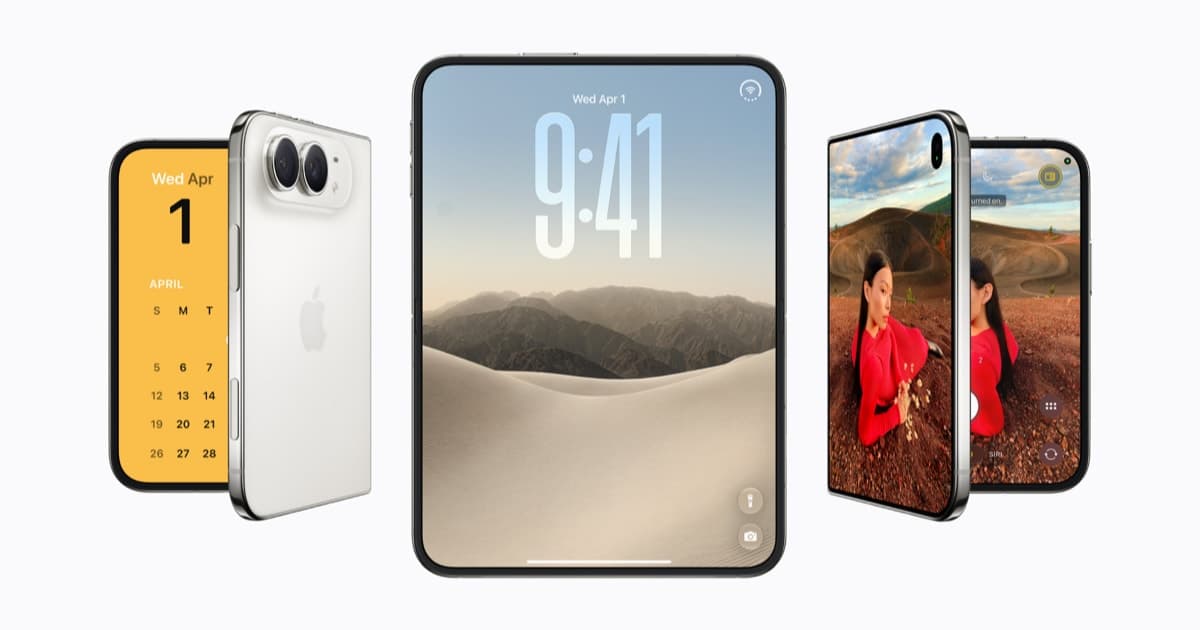
Image:
Apple Newsroom
Tomorrow is the day. Pre-orders for iPhone Duo, Apple's first folding iPhone, open at 1pm UK time on Friday 16 October, and the first ones arrive a week later on Friday 23 October. If you have been waiting for this since September, here is everything you need to have sorted before one o'clock, what to do tonight, where your saved order hides in the Apple Store app, and how to give yourself the best chance of a launch-day delivery.
The times, wherever you are
Apple opens pre-orders at the same moment worldwide, so the local time depends on where you are:
- UK: 1pm on Friday 16 October
- US: 5am Pacific, 8am Eastern
- Europe: 2pm in Berlin and Paris
- Australia: 10pm in Sydney, and just after midnight on Saturday in New Zealand
- Anywhere else: the Duo page on your country's Apple site shows the local time at the top
It opens in more than 70 countries at once, with another 28 following on 30 October. Delivery and in-store availability start on Friday 23 October, and the networks are taking pre-orders from Friday too.
Tonight: save your order before 5am
Since Monday Apple has let you choose your Duo in advance, pick the storage and colour, add a case, sort out a trade-in or finance, and save the lot, so that at 1pm on Friday it is a single tap to place the order rather than a race through checkout. That window closes at 5am UK time on Friday morning, so if you have not done it, do it this evening. I did mine on the website earlier in the week, a Star White 256GB, and it took five minutes.
The question I have been asked most is where that saved order goes afterwards, because it does not sit in your bag like a normal purchase. Open the Apple Store app, tap the account icon at the top right, and the Duo you set up is listed there with your devices that are ready to pre-order. On the website it is the same idea: sign in at apple.com/uk, open your account, and the saved iPhone is waiting. Have the app open on that screen a couple of minutes before 1pm tomorrow, and when the button goes live, tap it and confirm.
If you did not
If 5am comes and goes, you can still order from 1pm, you will just be doing the full checkout while everyone else is tapping one button, so get the fiddly bits done beforehand. Make sure you are signed in to the Apple Store app with your Apple Account, that your delivery address and card are already saved, and that you have decided on storage, colour and whether you are trading in. Every screen you can skip at 1pm is a delivery slot you keep.
What it costs
Both finishes, Night Sky and Star White, are the same price, and the only choice that changes the number is storage:
- 256GB: £1,999
- 512GB: £2,199
- 1TB: £2,599
- 2TB: £3,199
Apple's own finance spreads that over 30 months at 0% APR, which works out at £66.63 a month for the 256GB, and Apple Trade In will take between £40 and £855 off for an iPhone 8 Plus or newer, applied instantly at checkout. If you want a monthly deal instead, the networks have theirs up today too, so it is worth a comparison before you commit.
Two small things to know before Friday. The Duo is eSIM only, so if you are coming from a phone with a physical SIM, your network moves you across once the new phone arrives and you should not need to do anything beforehand. And if you want a case, Apple's own two-part iPhone Duo Case is £79 and the Folio with a kickstand is £129, both orderable from Friday as part of the same checkout.
Which storage? I went for 256GB and that is what I would tell most customers to do, unless you are happy to pay £200 more to double it. Photos and video live in iCloud and the Duo's big inner screen does not change how much space your apps take up, so 512GB is for people who shoot a lot of 4K video or keep films downloaded for travel, and the 1TB and 2TB models are really for people editing video on the phone itself. On colour, if you possibly can, go and see both in an Apple Store before you decide. They are on display now, and Night Sky and Star White look quite different in the hand from how they do on the website.
Getting a launch-day delivery
The first batch always goes quickly, and the orders placed in the first few minutes are the ones that turn up on the 23rd. This time there is an extra reason to be in early: if the rumours about demand and supply are anywhere near right, Friday's stock could be the last that is easy to get before Christmas. That is rumour, not Apple, but I would not bet against it. A few things that help:
- Be quick. Have the app open on your saved order at 12:58, and when the button appears, tap it and confirm without second-guessing the colour.
- Be careful with refreshing. Hammering refresh at 1pm is the easiest way to get stuck behind a loading screen while other people's orders go through. If nothing happens, give it ten seconds and try once.
- If delivery has already slipped into November by the time you get through, check Apple Store pickup. Store stock is allocated separately and often shows an earlier date.
- The networks are worth a look for the same reason, because they have their own allocation.
- Decide about AppleCare+ later if you want to. You have 60 days after the phone arrives to add it, so it does not need to slow you down on the day.
If you are still deciding whether the Duo is the right iPhone for you at all, my explainer from September covers what it is and is not, and the buyer’s guide puts it next to the 18 Pro and 18 Pro Max. The short version is that it is a brilliant, expensive, first-generation product, and if you are the kind of person who has been counting down to this morning, you already know you are buying one.
And if it arrives next Friday and you would like a hand moving everything across from your old phone, that is exactly the sort of thing a session with iHelp is for. Good luck at one o'clock tomorrow.
Alex