
Apple HomeView Explained: What It Does, Who It's For and What It Costs
Published:
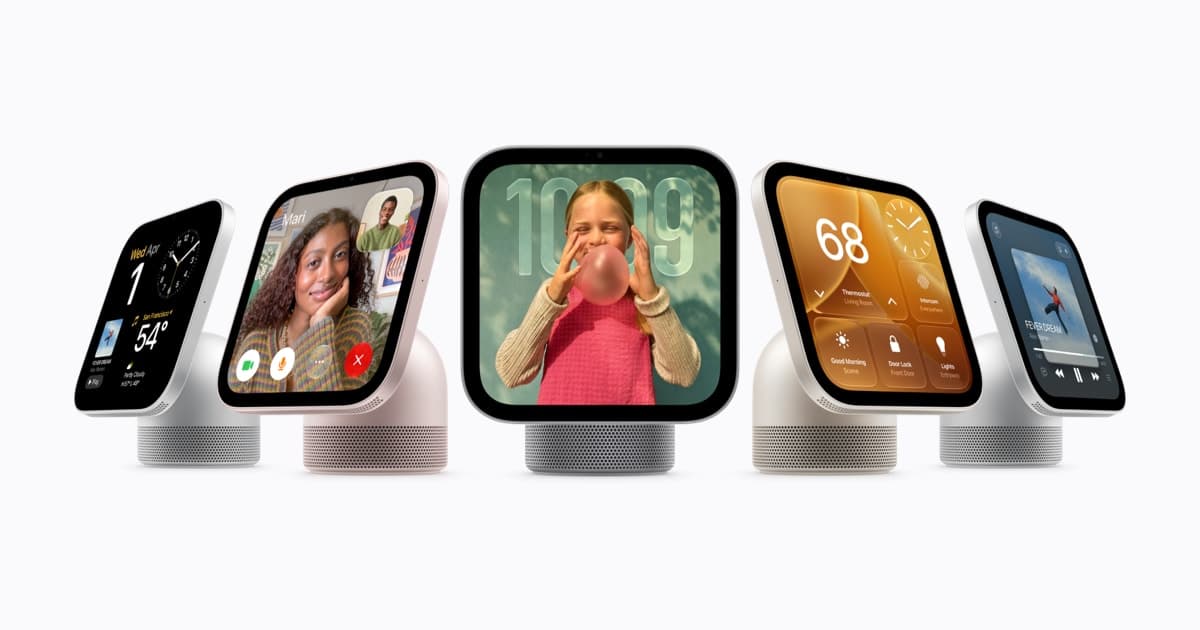
Image:
Apple Newsroom
Of everything Apple announced this week, HomeView is the one customers have asked me about most, usually in the form of 'what is it for?'. Fair question, because Apple has never made anything like it. Here is what it does, what you need to get the most out of it, and who I think should and should not buy one.
What it is
HomeView is a 7-inch screen, roughly the size of an iPad mini, that lives in one place in your home. The tabletop version sits on a rounded speaker base with a hinge so you can tilt it, in silver, starlight, rose pink or space grey. The wall-mounted version is the same screen flattened against the wall, in space grey or silver, with its own speakers tuned for being on a wall. Both are £299, and the wall one needs a mount, which Schneider sells from £54.95.
Inside is the A18 chip, so it is as quick as a recent iPhone, with a camera for FaceTime and microphones for Siri. It knows who is standing in front of it: up to six people can enrol their face, and when it recognises you it shows your calendar, messages and reminders, and only yours, provided your iPhone is nearby and has been unlocked recently.
What it does day to day
- FaceTime calls with the camera that keeps you in frame, and Messages by voice or on-screen keyboard
- Intercom to other rooms, and Find My for the things you lose
- Recipes read step by step with timers you start by voice
- Music, podcasts, Apple TV and the radio, on its own or with your HomePods in other rooms
- A home dashboard showing up to nine camera feeds, with the doorbell popping up when someone presses it
- Siri AI for questions and for controlling the home, in English, and in beta at launch
When nobody is using it, it is a photo frame, a clock that reacts to the weather, or Snoopy, depending on which face you choose.
What you need
This is the part worth reading twice. HomeView works on its own for music, calls and the basic smart home, but the personal features, your messages and calendar, Siri knowing about your life, need a paired iPhone or iPad that supports Apple Intelligence, which means an iPhone 15 Pro or anything newer. Face recognition for cameras, package detection and the video descriptions need an iCloud+ plan. And Siri AI is English only at launch, in beta, so expect it to be clever one minute and confused the next for a while.
Who it suits
A household that already has an Apple doorbell or cameras in the Home app, and wants a screen in the kitchen to see them on, will get a lot from it. So will families who use FaceTime constantly with relatives, because a fixed screen that answers calls is far easier for an older parent than a phone that has to be found first. If that sounds like you or someone you look after, it is a good buy, and I would rather you had this than a Google or Amazon screen that does not talk to your iPhone.
Who should wait
If you mainly want music, HomePod mini 2 does that for half the price. If your iPhone is older than a 15 Pro, you will miss the personal features that make it clever. And if you simply like the idea but do not have a job for it yet, wait for the reviews and the first software update. New categories from Apple always settle down by their second version, and £299 is a lot for a screen that spends most of its day being a clock.
It reaches homes on Friday 13 November and you can pre-order now. If you buy one and want it set up properly, with the faces enrolled and the cameras connected, that is a session we would happily do.
Alex